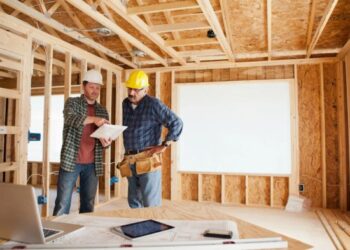
Smart security system installation is not just about protecting your property, but also about peace of mind. Imagine having the ability to monitor your home from anywhere, receive instant alerts, and deter potential intruders with cutting-edge technology. This guide delves into the world of smart security systems, exploring their benefits, installation process, and maintenance tips.
Get ready to take your home security to the next level.
As we delve deeper into the details, you'll uncover valuable insights into the realm of smart security system installation, empowering you to make informed decisions for a safer and smarter home environment.
Importance of Smart Security Systems
Smart security systems play a crucial role in ensuring the safety and security of our homes. These advanced systems offer a wide range of benefits compared to traditional security setups, making them an essential investment for modern homeowners.
Enhanced Home Security
Smart security systems provide enhanced home security through features such as real-time monitoring, remote access, and smart alerts. These systems allow homeowners to keep a close eye on their property at all times, even when they are away, providing peace of mind and ensuring a quick response to any security threats.
Improved Safety Features
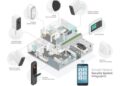
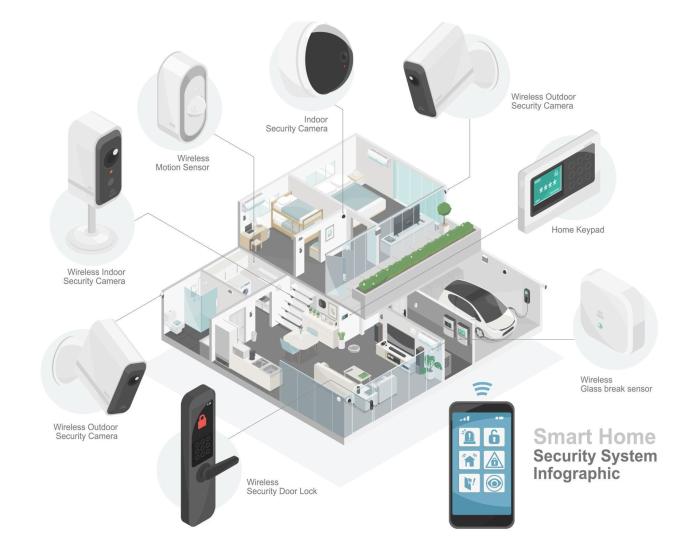
- Video Doorbells: Smart security systems often include video doorbells that allow homeowners to see and communicate with visitors remotely, enhancing safety by providing visual verification before opening the door.
- Motion Sensors: Motion sensors can detect any suspicious movement around the property and trigger alerts, helping to deter potential intruders and improve overall safety.
- Smart Locks: Smart locks offer keyless entry and remote locking capabilities, allowing homeowners to control access to their homes more effectively and securely.
Comparison with Traditional Security Systems
Compared to traditional security systems, smart security systems offer advanced features, seamless integration with other smart devices, and increased customization options. While traditional systems may provide basic security, smart systems take it a step further by leveraging technology to deliver a more comprehensive and efficient security solution.
Planning for Installation
When planning to install a smart security system, there are several important initial steps to consider. It is crucial to assess the layout and size of your property, identify potential security vulnerabilities, and determine your specific security needs and goals.
Key Areas for Security Cameras
- Entrances: Install cameras at all entry points such as doors, windows, and garage doors to monitor who is coming in and out of your home.
- Backyard: Place cameras overlooking your backyard to keep an eye on outdoor spaces and deter potential intruders.
- Driveway: Install cameras near the driveway to capture footage of vehicles entering and exiting your property.
- Common Areas: Consider placing cameras in common areas like the living room or kitchen to monitor activity inside your home.
Choosing the Right Smart Security System
Before selecting a smart security system, it is essential to consider factors such as the size of your property, your budget, desired features (such as motion detection or night vision), and ease of installation. Research different brands and models to find the system that best fits your needs.
Tips for Creating a Security System Installation Plan
- Conduct a thorough security assessment of your property to identify weak points and determine the number of cameras needed.
- Create a detailed floor plan of your home, marking where each camera will be installed for optimal coverage.
- Consider the power source for your cameras (battery-operated or wired) and ensure they are placed out of reach of potential tampering.
- Think about remote access and monitoring capabilities to ensure you can check your security system from anywhere at any time.
Installation Process
When it comes to installing a smart security system, there are several key steps to follow to ensure everything is set up correctly and functioning effectively. From positioning cameras strategically to connecting various components, each step plays a crucial role in creating a secure environment for your home or business.
Tools and Equipment Required
- Drill and screws for mounting cameras and sensors
- Power drill for creating holes for wires
- Screwdrivers for assembling components
- Network cables for connecting cameras to the system
- Smartphone or computer for accessing the system remotely
Importance of Strategic Positioning
- Ensure cameras cover entry points such as doors and windows
- Place cameras at a height where faces are easily recognizable
- Avoid placing cameras in direct sunlight or areas with extreme weather conditions
- Position motion sensors in areas with high traffic to detect any movement accurately
Connecting and Setting Up Components
- Follow the manufacturer's instructions for connecting cameras to the central hub
- Set up the system's app on your smartphone or computer for remote monitoring
- Test the system to ensure all cameras, sensors, and alarms are working correctly
- Adjust settings such as motion detection sensitivity and alarm notifications as needed
Troubleshooting and Maintenance
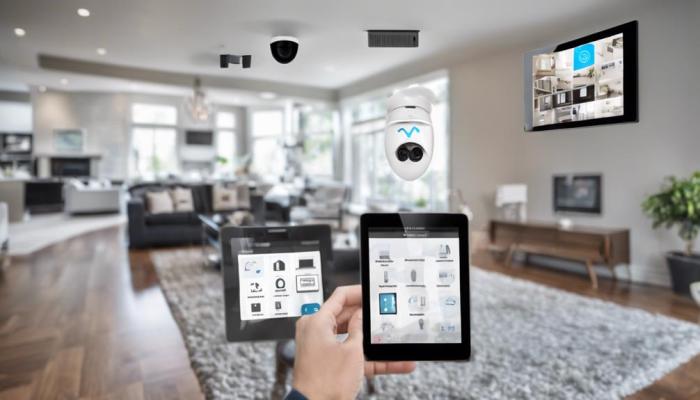
When it comes to smart security systems, troubleshooting and regular maintenance are crucial to ensure optimal performance and efficiency. Let's delve into common issues that may arise during or after installation, solutions for connectivity problems, the importance of maintenance, and tips for longevity of your system.
Common Issues and Solutions
After the installation of a smart security system, you may encounter some common issues such as connectivity problems, sensor malfunctions, or software glitches. Here are some solutions to troubleshoot these issues:
- Check the power source and ensure all devices are properly connected.
- Reset the system by rebooting the main control panel.
- Update the software and firmware of the system to the latest versions.
- Inspect sensors for any obstructions or damages that may affect their functionality.
Importance of Regular Maintenance
Maintaining your smart security system regularly is essential to keep it running smoothly and effectively. Regular maintenance can help prevent unexpected failures and ensure that all components are functioning correctly. Here are some tips for maintaining your system:
- Perform routine checks on all devices and sensors to ensure they are working properly.
- Keep the system software updated to the latest version to enhance security and performance.
- Clean cameras and sensors regularly to prevent dirt or debris from affecting their functionality.
- Test the system periodically to make sure all components are communicating effectively.
Tips for Longevity and Efficiency
To prolong the life of your smart security system and maintain its efficiency, consider the following tips:
- Choose high-quality components from reputable brands for better reliability.
- Secure your network to prevent unauthorized access and potential security breaches.
- Position cameras and sensors strategically to maximize coverage and minimize blind spots.
- Invest in a backup power source to ensure continuous operation during power outages.
Conclusion
In conclusion, smart security system installation is a game-changer in the realm of home security. By embracing this technology, you are not only safeguarding your property but also elevating your peace of mind. Stay ahead of potential threats and enjoy a secure living space with a smart security system in place.
Questions and Answers
Where should security cameras be installed for optimal coverage?
Security cameras should be placed at entry points, such as front and back doors, garage, and first-floor windows, as well as in areas with valuable assets. Make sure to cover blind spots and vulnerable areas for comprehensive surveillance.
What are the benefits of a smart security system over traditional systems?
Smart security systems offer remote access, real-time alerts, integration with smart devices, and advanced features like motion detection and facial recognition, enhancing overall security and convenience.
How often should a smart security system be maintained?
Regular maintenance of a smart security system is essential to ensure optimal performance. Conduct system checks monthly, clean cameras and sensors regularly, update software, and replace batteries as needed.